Writing middleware for use in Express apps
Middleware functions are functions that have access to the request object (req), the response object (res), and the next function in the application's request-response cycle. The next function is a function in the Express router which, when invoked, executes the middleware succeeding the current middleware.
Middleware functions can perform the following tasks:
- Execute any code.
- Make changes to the request and the response objects.
- End the request-response cycle.
- Call the next middleware in the stack.
If the current middleware function does not end the request-response cycle, it must call next() to pass control to the next middleware function. Otherwise, the request will be left hanging.
The following figure shows the elements of a middleware function call:
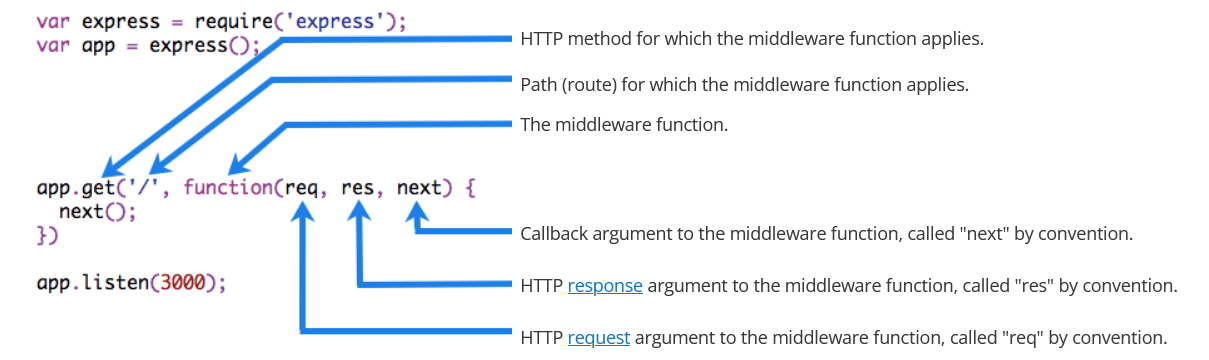
Starting with Express 5, middleware functions that return a Promise will call next(value) when they reject or throw an error. next will be called with either the rejected value or the thrown Error.
Example
Here is an example of a simple "Hello World" Express application. The remainder of this article will define and add three middleware functions to the application: one called myLogger that prints a simple log message, one called requestTime that displays the timestamp of the HTTP request, and one called validateCookies that validates incoming cookies.
const express = require('express');
const app = express();

app.get('/', (req, res) => {
  res.send('Hello World!');
});

app.listen(3000);import express from 'express';
const app = express();
app.get('/', (req, res) => {
res.send('Hello World!');
});
app.listen(3000);import express, { type Express, type Request, type Response } from 'express';
const app: Express = express();
app.get('/', (req: Request, res: Response) => {
res.send('Hello World!');
});
app.listen(3000);Middleware function myLogger
Here is a simple example of a middleware function called "myLogger". This function just prints "LOGGED" when a request to the app passes through it. The middleware function is assigned to a variable named myLogger.
const myLogger = function (req, res, next) {
  console.log('LOGGED');
  next();
};import { type Request, type Response, type NextFunction } from 'express';
const myLogger = function (req: Request, res: Response, next: NextFunction) {
console.log('LOGGED');
next();
};Here myLogger is defined on its own rather than passed directly to app.use(), so TypeScript has no context to infer its parameters and they are annotated explicitly. You can instead type the whole function as RequestHandler, which types req, res, and next for you. When the middleware is written inline in the app.use() call, Express infers those three parameters and no annotations are needed.
DANGER
Notice the call above to next(). Calling this function invokes the next middleware function in the app. The next() function is not a part of the Node.js or Express API, but is the third argument that is passed to the middleware function. The next() function could be named anything, but by convention it is always named "next". To avoid confusion, always use this convention.
To load the middleware function, call app.use(), specifying the middleware function. For example, the following code loads the myLogger middleware function before the route to the root path (/).
const express = require('express');
const app = express();

const myLogger = function (req, res, next) {
  console.log('LOGGED');
  next();
};

app.use(myLogger);

app.get('/', (req, res) => {
  res.send('Hello World!');
});

app.listen(3000);import express from 'express';
const app = express();
const myLogger = function (req, res, next) {
console.log('LOGGED');
next();
};
app.use(myLogger);
app.get('/', (req, res) => {
res.send('Hello World!');
});
app.listen(3000);import express, { type Express, type Request, type Response, type NextFunction } from 'express';
const app: Express = express();
const myLogger = function (req: Request, res: Response, next: NextFunction) {
console.log('LOGGED');
next();
};
app.use(myLogger);
app.get('/', (req: Request, res: Response) => {
res.send('Hello World!');
});
app.listen(3000);Every time the app receives a request, it prints the message "LOGGED" to the terminal.
The order of middleware loading is important: middleware functions that are loaded first are also executed first.
If myLogger is loaded after the route to the root path, the request never reaches it and the app doesn't print "LOGGED", because the route handler of the root path terminates the request-response cycle.
The middleware function myLogger simply prints a message, then passes on the request to the next middleware function in the stack by calling the next() function.
Middleware function requestTime
Next, we'll create a middleware function called "requestTime" and add a property called requestTime to the request object.
DANGER
Because the middleware adds a property to req, extend the request type in TypeScript with declaration merging. Declare the property (as optional, since a middleware may not run for every request) in a .d.ts file that is part of your project:
declare global {
  namespace Express {
    interface Request {
      requestTime?: number;
    }
  }
}

export {};
TypeScript picks up the file automatically, so no tsconfig.json change is needed unless you have set a custom include that does not cover its location. See Extending the API in TypeScript for adding other custom properties and methods.
const requestTime = function (req, res, next) {
  req.requestTime = Date.now();
  next();
};import { type Request, type Response, type NextFunction } from 'express';
const requestTime = function (req: Request, res: Response, next: NextFunction) {
req.requestTime = Date.now();
next();
};The app now uses the requestTime middleware function. Also, the callback function of the root path route uses the property that the middleware function adds to req (the request object).
const express = require('express');
const app = express();

const requestTime = function (req, res, next) {
  req.requestTime = Date.now();
  next();
};

app.use(requestTime);

app.get('/', (req, res) => {
  let responseText = 'Hello World!<br>';
  responseText += `<small>Requested at: ${req.requestTime}</small>`;
  res.send(responseText);
});

app.listen(3000);import express from 'express';
const app = express();
const requestTime = function (req, res, next) {
req.requestTime = Date.now();
next();
};
app.use(requestTime);
app.get('/', (req, res) => {
let responseText = 'Hello World!<br>';
responseText += `<small>Requested at: ${req.requestTime}</small>`;
res.send(responseText);
});
app.listen(3000);import express, { type Express, type Request, type Response, type NextFunction } from 'express';
const app: Express = express();
const requestTime = function (req: Request, res: Response, next: NextFunction) {
req.requestTime = Date.now();
next();
};
app.use(requestTime);
app.get('/', (req: Request, res: Response) => {
let responseText = 'Hello World!<br>';
responseText += `<small>Requested at: ${req.requestTime}</small>`;
res.send(responseText);
});
app.listen(3000);When you make a request to the root of the app, the app now displays the timestamp of your request in the browser.
Middleware function validateCookies
Finally, we'll create a middleware function that validates incoming cookies and sends a 400 response if cookies are invalid.
Here's an example function that validates cookies with an external async service.
async function cookieValidator(cookies) {
  try {
    await externallyValidateCookie(cookies.testCookie);
  } catch {
    throw new Error('Invalid cookies');
  }
}async function cookieValidator(cookies: Record<string, string>) {
try {
await externallyValidateCookie(cookies.testCookie);
} catch {
throw new Error('Invalid cookies');
}
}Here, we use the cookie-parser middleware to parse incoming cookies off the req object and pass them to our cookieValidator function. The validateCookies middleware returns a Promise that upon rejection will automatically trigger our error handler.
const express = require('express');
const cookieParser = require('cookie-parser');
const cookieValidator = require('./cookieValidator');

const app = express();

async function validateCookies(req, res, next) {
  await cookieValidator(req.cookies);
  next();
}

app.use(cookieParser());

app.use(validateCookies);

// error handler
app.use((err, req, res, next) => {
  res.status(400).send(err.message);
});

app.listen(3000);import express from 'express';
import cookieParser from 'cookie-parser';
import cookieValidator from './cookieValidator';
const app = express();
async function validateCookies(req, res, next) {
await cookieValidator(req.cookies);
next();
}
app.use(cookieParser());
app.use(validateCookies);
// error handler
app.use((err, req, res, next) => {
res.status(400).send(err.message);
});
app.listen(3000);import express, { type Express, type Request, type Response, type NextFunction } from 'express';
import cookieParser from 'cookie-parser';
import cookieValidator from './cookieValidator';
const app: Express = express();
async function validateCookies(req: Request, res: Response, next: NextFunction) {
await cookieValidator(req.cookies);
next();
}
app.use(cookieParser());
app.use(validateCookies);
// error handler
app.use((err: Error, req: Request, res: Response, next: NextFunction) => {
res.status(400).send(err.message);
});
app.listen(3000);DANGER
Note how next() is called after await cookieValidator(req.cookies). This ensures that if cookieValidator resolves, the next middleware in the stack will get called. If you pass anything to the next() function (except the string 'route' or 'router'), Express regards the current request as being an error and will skip any remaining non-error handling routing and middleware functions.
Because you have access to the request object, the response object, the next middleware function in the stack, and the whole Node.js API, the possibilities with middleware functions are endless.
Read more
For more information about Express middleware, see the Using Express middleware guide.
Configurable middleware
If you need your middleware to be configurable, export a function which accepts an options object or other parameters, which, then returns the middleware implementation based on the input parameters.
module.exports = function (options) {
  return function (req, res, next) {
    // Implement the middleware function based on the options object
    next();
  };
};export default function (options) {
return function (req, res, next) {
// Implement the middleware function based on the options object
next();
};
}import { type Request, type Response, type NextFunction } from 'express';
export default function (options: Record<string, unknown>) {
return function (req: Request, res: Response, next: NextFunction) {
// Implement the middleware function based on the options object
next();
};
}The middleware can now be used as shown below.
const mw = require('./my-middleware.cjs');

app.use(mw({ option1: '1', option2: '2' }));import mw from './my-middleware.mjs';
app.use(mw({ option1: '1', option2: '2' }));Refer to cookie-session and compression for examples of configurable middleware.